PhotoshopForums.com Home
Navigate Contact FAQ Search Members
Selecting and deleting (Basic)
Post new topic   Reply to topic    PhotoshopForums.com Forum Index -> Tools and Panels
 See a User Guidelines violation? Please contact us.
Author Message

Tristan

Joined: 15 Oct 2010
Posts: 1


PostPosted: Sat Oct 16, 2010 3:56 am    Post subject: Selecting and deleting (Basic) Reply with quote

Hi,

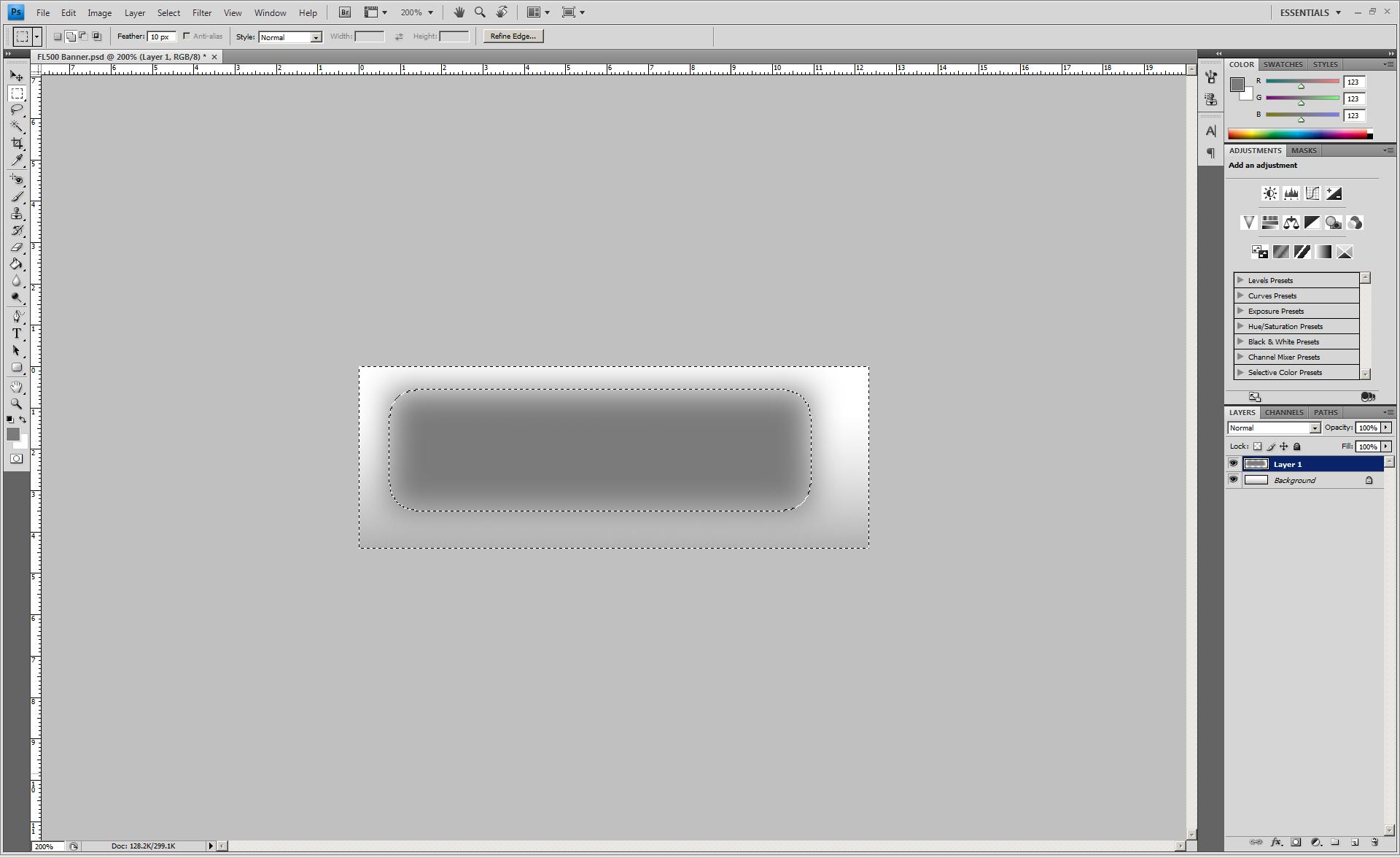
Im new to this forum so Hi! I was doing some photoshop yesterday when I tried to select something, fill it then select it again with some feather to get a curve then press delete to get the filled colour upto the line. Instead, it faded over the line which isn't what I want it to do.... I have attached an image of what im looking at. I dont want to fade I just want it to delete upto the selected line I have choosen.

Regards,

Tristan M


Problem001.jpg
 Description:
 Filesize:  148.54 KB
 Viewed:  344 Time(s)

Problem001.jpg


View user's profile Send private message

Damo77

Joined: 28 Aug 2010
Posts: 114
Location: Brisbane, Australia


PostPosted: Sat Oct 16, 2010 2:46 pm    Post subject: Reply with quote

I can't quite understand your question, but I can guarantee that the answer involves layers. How familiar are you with layers?
_________________
http://www.damiensymonds.com.au/
http://damiensymonds.blogspot.com/
View user's profile Send private message Visit poster's website
Display posts from previous:   
Post new topic   Reply to topic    PhotoshopForums.com Forum Index -> Tools and Panels All times are GMT - 6 Hours
Page 1 of 1
Jump to:  
You cannot post new topics in this forum
You cannot reply to topics in this forum
You cannot edit your posts in this forum
You cannot delete your posts in this forum
You cannot vote in polls in this forum
You cannot attach files in this forum
You can download files in this forum


Contact - User Guidelines >

Copyright © 2003-2016. PhotoshopForums.com, iFroggy Network. All Rights Reserved.
Powered by phpBB © phpBB Group. phpBB SEO. Privacy Policy.
We are in no way affiliated with Adobe. Photoshop, Adobe and related marks are registered trademarks of Adobe.
PhotoshopForums.com